Buying & Connecting Phone Numbers
Learn how to search, purchase, and assign phone numbers to your AI voice agents on NovaReps.
Updated Oct 28, 2026 · 4 min read
On this page
Overview #
Phone numbers connect incoming telephone callers directly to your AI agents. Depending on your subscription plan and system configuration, phone numbers are provisioned through platform providers (Twilio or Telnyx) or using your own Bring Your Own Key (BYOK) account.
Steps to Buy a Phone Number #
- Go to Phone Numbers in your dashboard sidebar (
/dashboard/phone-numbers). - Click Buy Phone Number.
- Choose your desired Country (e.g., United States
US, CanadaCA, United KingdomGB). - Enter an Area Code or city search term to filter available local or toll-free numbers.
- Click Search Numbers.
- Review available options and click Buy Number next to your preferred choice.
Assigning a Number to an Agent #
Once purchased, assign the number so incoming calls reach your AI receptionist:
- Go to Phone Numbers or edit an existing agent under Agents.
- Select the Assigned Agent from the dropdown menu.
- Choose line mode: Exclusive Line (dedicated to one agent) or Shared Line (accessible via extension access codes).
- Click Save Changes.
Now, any phone call made to that number will instantly trigger your AI agent!
Let the Agent Answer Text Messages #
People who text your number can get replies from the agent assigned to it, using the same instructions and knowledge as your calls.
Texting is switched on for the agent, not for each number, and it covers every number assigned to that agent.
- Open the agent under Agents and go to Channels, then SMS.
- Switch on Let the agent answer texts.
- Save the change.
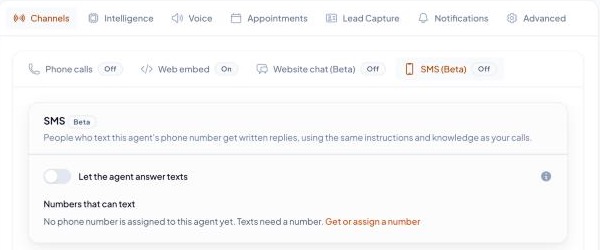
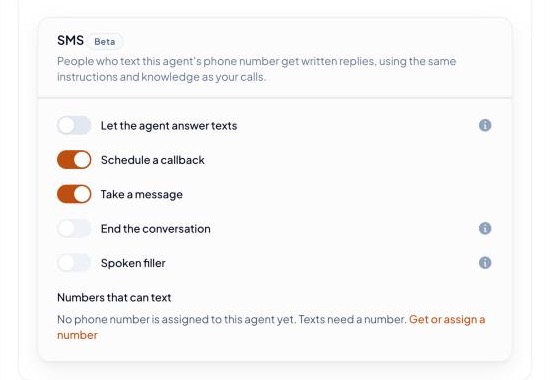
Below the switch, each tool the agent has appears with its own switch. Switch a tool off to stop the agent using it in text conversations only. Greyed tools, such as call transfer, cannot work on text and show why when you hover the info icon. Only the first five tools show. The rest sit under More tools.
Good to know:
- The SMS tab lists the agent's numbers and shows whether each one can text. Texting is only open for some countries. A number from another country shows as unable to text, and its edit form on Phone Numbers says Not available in this country.
- On Phone Numbers, Edit shows a read-only Texts line with the agent that answers and whether it is on, with a link to the agent's SMS tab.
- The SMS tab only works when your plan includes text conversations. Without them it shows a small gem icon (hover it to see why) and stays locked.
- Each reply the agent sends counts against your plan's text messages. See Billing & Plans.
- The agent replies only while the number is enabled and an inbound agent is assigned to it. If the person is already in a conversation, the same agent carries it on.
- If someone texts STOP, the agent stops texting them from that number. START, UNSTOP and HELP are answered by the carrier, not by the agent.
- After a long quiet period (24 hours by default), the conversation ends. Their next text starts a new one.
- Text conversations appear in Call History with a text message label.
Number Allowances & Limits #
- Each plan includes a baseline allowance of phone numbers (e.g., 1 included number on Starter, 3 on Pro).
- Additional numbers can be purchased for a low monthly fee directly from the Phone Numbers page.
- If your plan requires BYOK for telephony, ensure your valid Twilio account credentials are connected under Developer -> API Keys.